
Event Reminder3.3.7 - Google Play
You'll be able to see results in few seconds.
Publisher Description
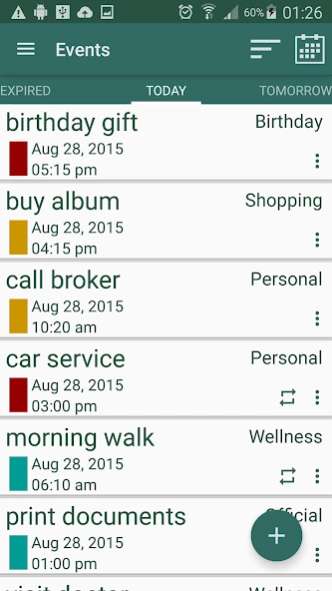
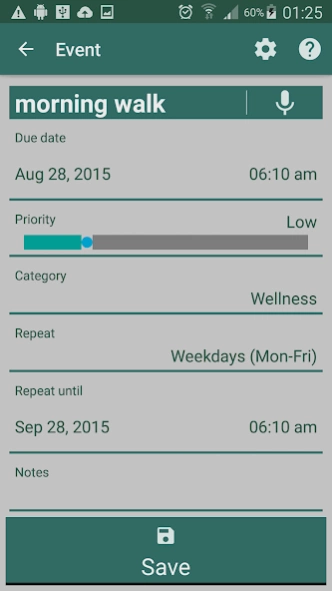
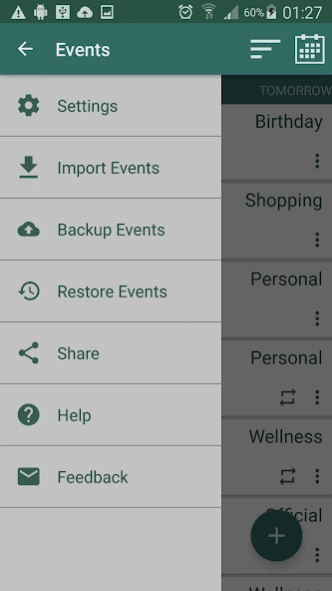
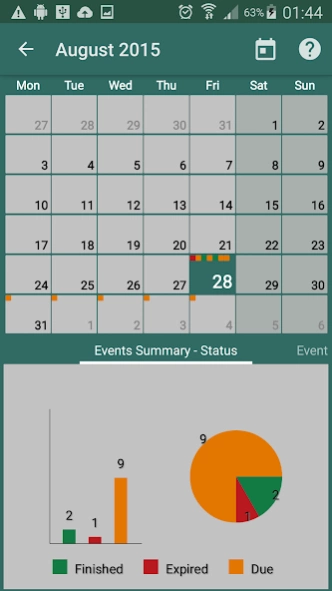
Manage your Event full life with ease and fun !!!
"Event Reminder" is a simple generic todo reminder app with a calendar where you can easily create reminder / alarm / todo of events planned by touching few buttons. It supports voice so you don't need to write event title. You can create "one time event" or "repeating events". While choosing repeating events, you can set frequency to repeat, for example, "every 2 days until 6 weeks" or "every weekends until 2 months" etc.
At home page you see a list of next set of due events with its priorities on the left to identify importance clearly. You swipe back to see expired and finished events. You swipe ahead to see next set of upcoming events. You can open calendar to see all your events for that month, depicted as status/priority color codes boxes. You can see events statistics with bar and pie graphs to monitor your progress effectively. You add event just by touching that day on calendar view or see list of events scheduled for that day.
You can control notification popups for reminder / alarm / todo based on event's priority. You can also enable / disable vibration and sound notifications as per your preference. You can finish or delete events individually or all at once in case of repeating events. You have even option to delete or finish single event in a series of repeating events.
Features :
• You can Add, View, Edit and Delete event / reminder / todo
• You can set event / alarm priority - High, Medium or Low on a easy slider
• You can set alarm tone and duration in settings / preferences
• You can set notification - Popups, Alarm or Vibrate
• You can add notes to your event / reminder / todo
• You can set event category from the default list of categories or create your own category
• You can set repeating events by hourly, daily, weekly, monthly or yearly with frequency to repeat
• You can set days to repeat, for example - weekdays, weekends or selective days in a week
• You can even export your events as a file in your SD card to import later or share with anyone else
• A number of date formats to choose, as per your preference
• You can select time format AM/PM (12hr) or 24hr
• You can see your events and events summary, in a interactive calendar view, and add event directly from there
• All your Events in 5 type of event lists -
- Finished
- Expired
- Today
- Tomorrow
- Upcoming
• You can sort event lists for easy navigation
- Subject
- Date
- Priority
- Category
About Event Reminder
The company that develops Event Reminder is PlayerApps. The latest version released by its developer is 3.3.7.
To install Event Reminder on your Android device, just click the green Continue To App button above to start the installation process. The app is listed on our website since 2016-11-27 and was downloaded 0 times. We have already checked if the download link is safe, however for your own protection we recommend that you scan the downloaded app with your antivirus. Your antivirus may detect the Event Reminder as malware as malware if the download link to com.playerapps.eventcalendar is broken.
How to install Event Reminder on your Android device:
- Click on the Continue To App button on our website. This will redirect you to Google Play.
- Once the Event Reminder is shown in the Google Play listing of your Android device, you can start its download and installation. Tap on the Install button located below the search bar and to the right of the app icon.
- A pop-up window with the permissions required by Event Reminder will be shown. Click on Accept to continue the process.
- Event Reminder will be downloaded onto your device, displaying a progress. Once the download completes, the installation will start and you'll get a notification after the installation is finished.
Program Details
System requirements
Download information
Pricing
Version History
version 3.3.7
posted on 2016-11-28
Version 3.3.7
- Polish language support
- Bug fixes
Version 3.3.6
- Fixes for missed alarm on lock screen
- Runtime permissions for Marshmallow
- Other bug fixes
Version 3.3.5
- Fix for lock screen issue
- Mute button on alert screen
- Fixes for date/time popup on low resolution devices
Version 3.3.43
- Bug fixes on settings screen and alert screen
Version 3.3.42
- Bug fixes on Date/Time popup and notifications
Version 3.3.41
- Bug fixes on notification buttons
Disclaimer
Official Google Play Link
We do not host Event Reminder on our servers. We did not scan it for viruses, adware, spyware or other type of malware. This app is hosted by Google and passed their terms and conditions to be listed there. We recommend caution when installing it.
The Google Play link for Event Reminder is provided to you by apps112.com without any warranties, representations or guarantees of any kind, so access it at your own risk.
If you have questions regarding this particular app contact the publisher directly. For questions about the functionalities of apps112.com contact us.
